Skip to content
Market Daybook

Offline trading journal · Chrome

Your trading journal shouldn't live on someone else's server.

Market Daybook is a trading journal for stocks, ETFs, and options that runs entirely inside Chrome's side panel — next to your broker, on your own device. No account, no cloud, no subscription. $29 once.

One-time purchase No account No subscription Works offline, permanently

What it does

Log the trade. Journal it while it's fresh. Face it on Sunday.

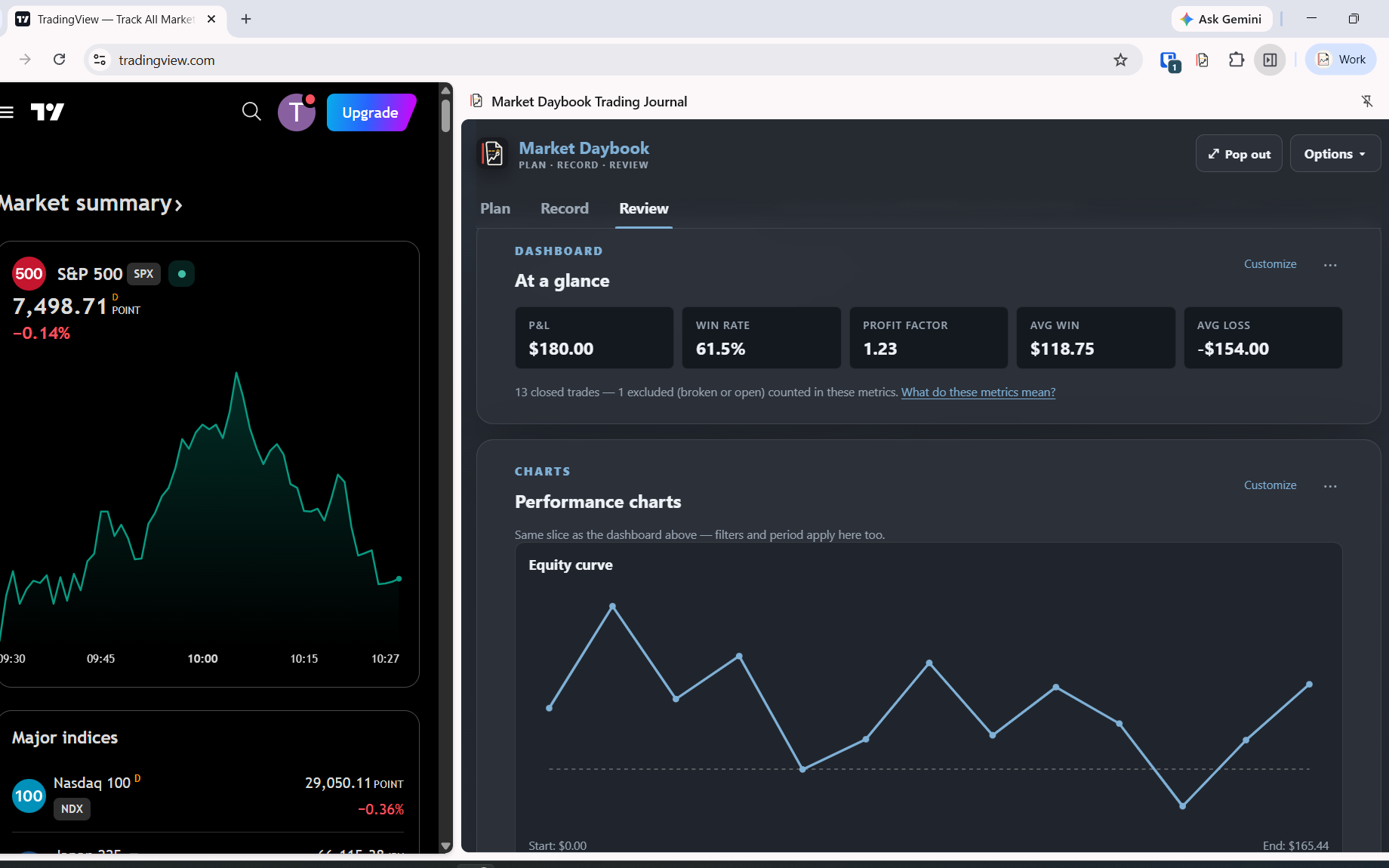
Market Daybook sits in Chrome's side panel next to your broker or charting platform. Log a trade — or paste your broker's trade history, or import a CSV — and it reconstructs your position from the fills: exact-decimal P&L, long and short, partial fills and scale-ins handled correctly.

Then it asks you what you were thinking. Strategy, confidence, emotion, and what went wrong from a mistakes vocabulary you build yourself.

At the end of the week it tells you one thing you did well, one mistake that cost you real money more than once, and one experiment to run next week. It only says something when the evidence actually supports it.

The side panel, next to your broker.
add screenshot-sidepanel.png

Features

Everything a discretionary trader actually reviews.

Trades in, three ways

Type them manually, including multi-leg scale-ins and scale-outs. Paste a table straight from your broker's trade history and let it detect the columns. Or import a CSV — dedicated parsers for Fidelity, Thinkorswim, and NinjaTrader, plus a column-mapper for any other broker.

Options, properly

Single-leg calls and puts, cash-secured and covered positions, and multi-leg strategy groups that resolve across their whole lifecycle — not just a list of legs you have to reassemble in your head.

Plan versus reality

Define your strategies and a pre-trade checklist. Every trade gets its own plan — entry, stop, target, invalidation, intended R — and a plan-adherence score. See planned-vs-actual R on every trade, and whether a win was a good win or just a lucky bad one.

A review that argues back

Weekly briefings surface your costliest repeated mistake, results broken down by strategy, and a single focused experiment. Plus a customizable dashboard and an Excel-like spreadsheet view of your whole log.

Privacy

Local-only, and you can verify it yourself.

Most trading journals ask you to upload your entire P&L history to a company you've never met. Market Daybook can't, structurally.

The extension ships a Content Security Policy of connect-src 'none'. That is Chrome enforcing, at the browser level, that this extension cannot make a network request — not to us, not to anyone. It's not a promise in a privacy policy. It's a line in the manifest you can read yourself before you install it.

It requests no host permissions. It runs no content scripts. It loads no remote code. There is no account to create, no server to sign into, and nothing to leak in a breach we couldn't have, because we never receive your data in the first place.

Your trades live in your browser, on your machine. Export them or delete them whenever you like, from the Data & privacy screen.

The one optional exception: if you turn on the downloads watcher, the extension asks for permission to notice when a broker CSV lands in your Downloads folder. It reads the filename only, and never opens the file until you click Import. It's off by default, and turning it off removes the permission again.

Pricing

$29 · once

Not $29 a month. Not a trial that expires into a subscription. One payment, one key, yours permanently — and the same key unlocks both the Chrome extension and the web app.

Install and use it read-only for as long as you like. Without a license you can view everything and export everything; you just can't add new trades. Your data is never held hostage.

Buy — $29one-time

Already using Market Daybook from the beta? You're licensed permanently, free. Nothing to do.

FAQ

Straight answers.

Is there a trading journal that works offline?

Yes. Market Daybook runs entirely in your browser with no network access at all — its Content Security Policy blocks outbound connections at the browser level. It works on a plane, and it works the same whether you're online or not.

Is there a trading journal with no subscription?

Market Daybook is $29 once, permanently. Most journals — TradeZella, TraderSync, TradesViz, Tradervue — are monthly or annual subscriptions. This one isn't.

Can I keep my trading data off the cloud?

That's the entire design. There's no account, no server, and no sync. Your trades are stored in your browser's local storage on your own device, and the extension is structurally incapable of transmitting them.

Which brokers does it import from?

Dedicated CSV parsers for Fidelity, Thinkorswim (stocks), and NinjaTrader. Any other broker works through the generic column-mapper, or by pasting your trade history table directly. There's no broker API connection — nothing to authorize, and no credentials to hand over.

Does it handle options?

Yes — single-leg calls and puts, cash-secured and covered positions, and multi-leg strategy groups tracked across their full lifecycle.

What happens if I don't buy a license?

The extension becomes read-only. You can view your entire history and export all of it at any time. You just can't record new trades until you enter a key.

How do I get my license key?

It's emailed to you immediately after purchase. Paste it into Settings → License in the extension. The same key works in the web app.

Does it place trades or connect to my broker?

No. Market Daybook never touches your broker account. It has no execution, no API connection, and no credentials. It records and reviews trades you've already made.
Honest scope

What it doesn't do

Built for US equities, ETFs, and options. Futures work through NinjaTrader's trade report import, using that broker's reported P&L rather than a full futures pricing model. No forex or crypto support yet.

No broker sync, no trade execution, no AI coach. It records what you did and makes you look at it.